
1、仓库 “https://ppa.launchpadcontent.net/fixnix/indicator-systemtray-unity/ubuntu noble Release” 没有 Release 文件
这个错误是因为 Ubuntu 24.04 (Noble Numbat) 的软件源中没有 indicator-systemtray-unity 这个 PPA 的版本。可能是因为该 PPA 尚未适配 Noble,或者已被弃用。
运行下面的命令查看PPA是否支持你的版本。如果结果中没有nuble,说明PPA还不支持当前版本。
curl -s http://ppa.launchpad.net/fixnix/indicator-systemtray-unity/ubuntu/dists/ | grep -o 'href=".*"' | cut -d'"' -f2解决方案
由于该 PPA 可能不再维护,建议移除它:
sudo add-apt-repository --remove ppa:fixnix/indicator-systemtray-unity
sudo apt update
2、ubuntu apt update 报错:无法安全地用该源进行更新,所以默认禁用该源
类似于如下报错
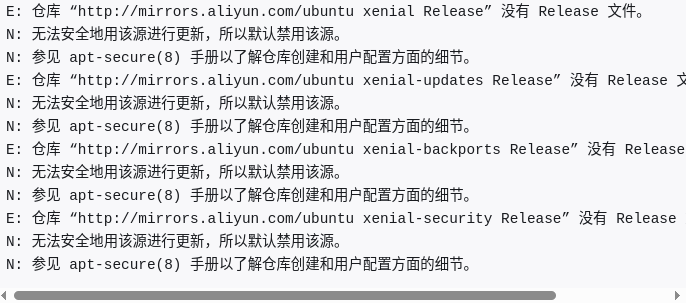
在 Ubuntu 24.04 之前,Ubuntu 的软件源配置文件使用传统的 One-Line-Style,路径为 /etc/apt/sources.list;从 Ubuntu 24.04 开始,Ubuntu 的软件源配置文件变更为 DEB822 格式,路径为 /etc/apt/sources.list.d/ubuntu.sources.list
如果没有这个文件,新建一个即可,将以下内容复制进去。注意:是24.04版本!
 默认注释了源码镜像以提高 apt update 速度,如有需要可自行取消注释
# Types: deb-src
# URIs: https://mirrors.tuna.tsinghua.edu.cn/ubuntu
# Suites: noble noble-updates noble-backports
# Components: main restricted universe multiverse
# Signed-By: /usr/share/keyrings/ubuntu-archive-keyring.gpg

# 以下安全更新软件源包含了官方源与镜像站配置,如有需要可自行修改注释切换
#Types: deb
#URIs: http://security.ubuntu.com/ubuntu/
#Suites: noble-security
#Components: main restricted universe multiverse
#Signed-By: /usr/share/keyrings/ubuntu-archive-keyring.gpg

# Types: deb-src
# URIs: http://security.ubuntu.com/ubuntu/
# Suites: noble-security
# Components: main restricted universe multiverse
# Signed-By: /usr/share/keyrings/ubuntu-archive-keyring.gpg

# 预发布软件源,不建议启用

# Types: deb
# URIs: https://mirrors.tuna.tsinghua.edu.cn/ubuntu
# Suites: noble-proposed
# Components: main restricted universe multiverse
# Signed-By: /usr/share/keyrings/ubuntu-archive-keyring.gpg

# # Types: deb-src
# # URIs: https://mirrors.tuna.tsinghua.edu.cn/ubuntu
# # Suites: noble-proposed
# # Components: main restricted universe multiverse
# # Signed-By: /usr/share/keyrings/ubuntu-archive-keyring.gpg